Cloud storage has become an essential tool for individuals and businesses that need secure access to files from anywhere. Instead of storing documents and media files only on local devices, cloud storage platforms allow users to store data online and access it through the internet.
Two of the most popular cloud storage services are Google Drive and Dropbox. Both platforms provide secure file storage, synchronization across devices, and collaboration tools. However, they differ in features, pricing, and usability. Understanding these differences helps users choose the best cloud storage solution for their needs.
What Is Cloud Storage
Cloud storage is a digital storage system that allows users to upload files to remote servers managed by cloud service providers. These files can be accessed from computers, smartphones, and tablets through internet connections.
Cloud storage services offer several advantages such as file backup, remote access, team collaboration, and protection against data loss.
Most platforms provide free storage space along with paid plans that offer larger storage capacity and additional features.
Overview of Google Drive
Google Drive is a cloud storage platform developed by Google. It integrates closely with other Google services such as Google Docs, Google Sheets, and Google Slides.
Users can store documents, photos, videos, and other files in their Google Drive account and access them from any device.
Google Drive is widely used by individuals, students, and businesses because it allows easy collaboration on documents and real-time editing by multiple users.
Key Features:
- Integration with Google Workspace apps
- Real-time document collaboration
- 15 GB of free storage
- Automatic backup and file synchronization
Overview of Dropbox
Dropbox is one of the earliest cloud storage services and is known for its simple file synchronization system. It allows users to upload files to the cloud and access them across multiple devices.
Dropbox focuses strongly on file management and sharing. It offers advanced synchronization features and supports many third-party integrations with productivity tools.
Businesses and professional teams often use Dropbox because of its strong collaboration and file-sharing capabilities.
Key Features:
- Fast and reliable file synchronization
- Strong file-sharing options
- Integration with many productivity apps
- Version history and file recovery
Storage Capacity Comparison
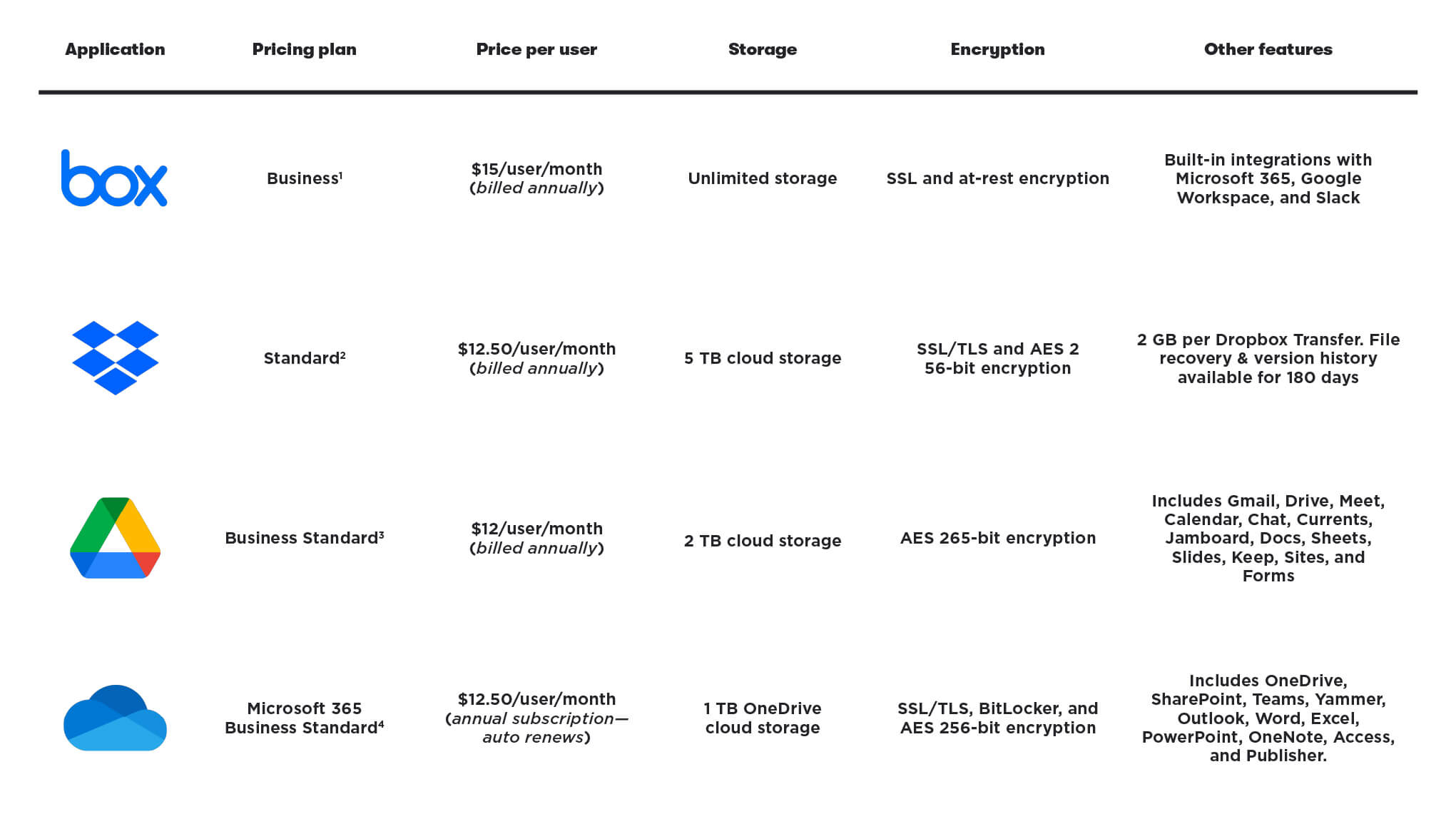
Google Drive offers one of the largest free storage plans among cloud storage providers. New users receive 15 GB of free storage that can be used across Google Drive, Gmail, and Google Photos.
Dropbox provides a smaller free storage plan, typically starting with 2 GB of space for new users. However, Dropbox offers additional storage through referrals and paid plans.
For users who rely heavily on free storage, Google Drive generally provides more capacity.
File Collaboration Features
Google Drive excels in real-time collaboration. Multiple users can work on the same document simultaneously using Google Docs, Sheets, or Slides.
This makes Google Drive particularly useful for students, remote teams, and businesses that require collaborative document editing.
Dropbox also supports collaboration, but it focuses more on file sharing and synchronization rather than real-time document editing.
Dropbox Paper is the platform’s collaborative document tool, although it is less widely used than Google’s productivity suite.
File Synchronization
Dropbox is known for having one of the fastest and most reliable file synchronization systems. Changes made to files are quickly updated across all connected devices.
This makes Dropbox popular among professionals who frequently work with large files such as designers, video editors, and developers.
Google Drive also offers file synchronization but may sometimes be slightly slower when handling very large files.
Security and Data Protection
Both Google Drive and Dropbox provide strong security features to protect user data.
Files stored on both platforms are encrypted during transfer and storage. Users can also enable two-factor authentication for additional account protection.
Dropbox offers advanced security features such as remote device wipe and file recovery options. Google Drive benefits from Google’s extensive security infrastructure and threat detection systems.
Pricing Plans
Google Drive offers several paid storage plans through Google One. These plans provide increased storage capacity along with additional benefits such as family sharing and enhanced support.
Dropbox also offers multiple subscription plans designed for individuals, professionals, and businesses. Dropbox business plans include advanced collaboration tools and team management features.
When comparing pricing, Google Drive generally offers more affordable storage options for personal users, while Dropbox offers stronger features for professional teams.
Which Cloud Storage Service Is Better
Choosing between Google Drive and Dropbox depends largely on the user’s needs.
Google Drive is ideal for users who rely heavily on document editing and collaboration through Google Workspace applications. It is also attractive for individuals who want more free storage.
Dropbox is often preferred by professionals who require fast file synchronization, advanced file sharing, and strong integration with third-party productivity tools.
Both services provide secure cloud storage solutions that allow users to access their files from anywhere.
Cloud storage has become an essential tool for managing digital files in modern workflows. Platforms such as Google Drive and Dropbox provide reliable storage, synchronization, and collaboration features that help individuals and businesses work more efficiently. By understanding the strengths of each platform, users can choose the cloud storage solution that best matches their productivity needs and data management preferences.